
You ask an assistant to compare three reports before a meeting. It starts working. You answer a message, return to the page, and find the same animated indicator.
Can you leave? Has it kept anything? Is it waiting for you?
The system may be making steady progress, waiting for a source, or unable to continue. A person looking at a generic busy state cannot tell which decision to make. The uncertainty becomes part of their work.
A useful progress experience helps someone understand the state of their task and choose what to do next. That includes the moments when the system needs help, when only part of the work is available, and when the person has to move on. The design begins with those decisions, before choosing an animation or a stream of generated text.
Name the job before it starts
For the fictional report comparison, the person should be able to see which three documents are in scope and what the assistant is preparing. A comparison of reported dates differs from a complete assessment of everything the reports contain.
State the useful output in ordinary language: a draft comparison with source references, ready for the person to review. Identify any step that requires their input or a later decision. That gives completion a meaning the interface can honor.
This also creates a stable point of reference when the task changes. If a fourth document is added or a source becomes unavailable, the product can explain how that affects the original request. A changing work plan should not quietly redefine what “done” means.
Show completed work without inventing certainty
A progress message can identify a document retrieved, a comparison prepared, or a check still outstanding. Those are useful observations when they correspond to recorded work.
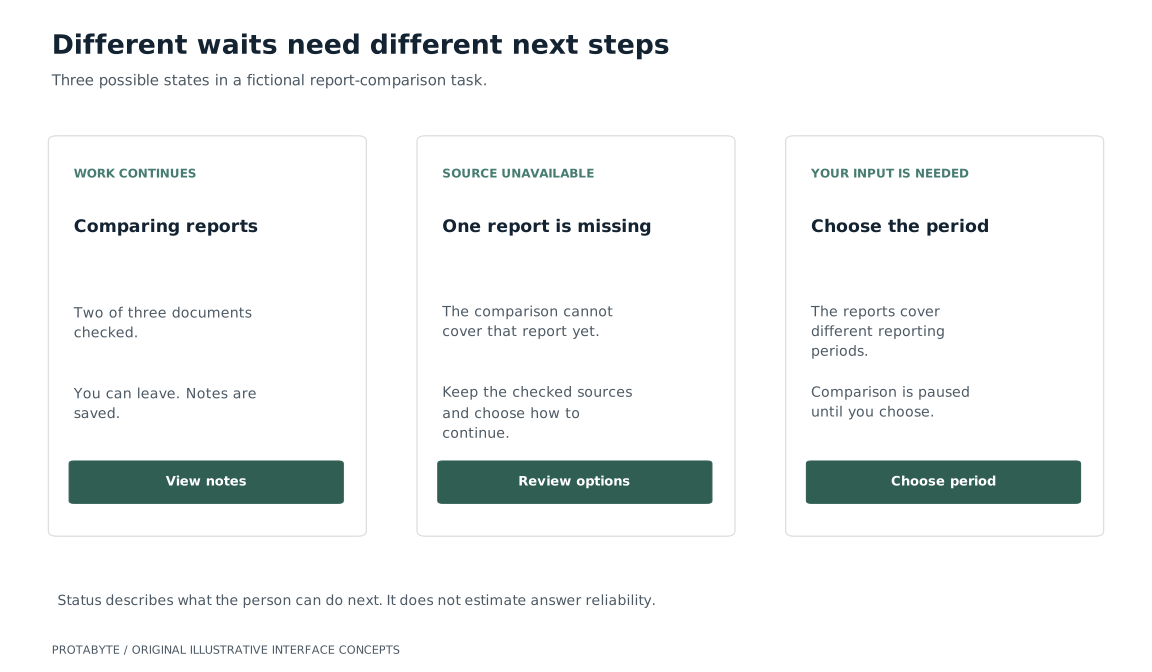
A source count can be helpful when the set is known. “Two of three documents checked” describes that particular step. It does not establish that two-thirds of the total effort is complete, or that the resulting answer is two-thirds reliable. Reading the final document may reveal more work.
When the remaining duration is unknown, say what is happening and what remains open. A percentage advancing on a timer creates a more precise promise than the system can necessarily support.
The same care applies to generated activity descriptions. A stream of plausible commentary is not evidence that a source was read or a result saved. Show milestones the application can substantiate, with detail available when someone wants to inspect them.
Distinguish waiting from needing a person
The next step differs between work that is continuing, a source that is unavailable, and a question that only the requester can resolve. Give those states different language and controls.
Task states and the information a person needs
Scroll to see all columns →
| What is happening | What the person needs to know |
|---|---|
| The comparison is continuing | What has been retained and whether they can leave |
| A source cannot be retrieved | Which part is missing and which recovery options exist |
| The requested period is ambiguous | The specific choice needed to continue |
| Work has stopped | What remains available and how to restart or change the task |
This is a useful design test: can a person tell whether the system is waiting on them? If the answer requires watching a spinner or reading an execution log, the main status message is leaving an important job unfinished.
Interrupt when a decision is needed
Routine progress does not always need an alert. A missing choice that blocks the task may deserve attention, while several completed retrievals can remain in the activity history.
Horvitz's mixed-initiative principles consider interruption costs, uncertain goals, and direct user controls. Here, an update should help someone act at a useful moment.
For the report comparison, a request to choose between reporting periods should explain why that distinction matters and what will happen after a choice. It should retain the work already completed. Requiring the person to re-enter the original request adds another interruption without resolving the uncertainty.
Offer notification choices that fit the task. A person who leaves the page may want one completion notice, while someone staying in the workspace may prefer a quiet status change. The product should make its actual notification behavior clear.
Let people leave and return with their place intact
A person should not have to keep an interface open merely because they cannot tell what leaving will do. If the system supports background work, explain where the task can be found and what is retained. If leaving interrupts execution, communicate that before the person loses their work.
On return, summarize meaningful changes since the last visit. The requester needs the question, current scope, saved output, and outstanding decisions. A long transcript can remain available without becoming the only way to reconstruct the task.
The Human-AI Interaction Guidelines address contextual timing, recent context, and user control. A return view should help someone continue the task.
The saved task should preserve the context that matters to the result. Returning to a comparison based on different source versions should make that change visible.
Make the stop control mean something specific
“Cancel” can mean abandoning a draft, stopping new retrievals, or asking a running operation to stop. Choose language that matches the behavior the system can deliver.
For a research task, “Stop new work” might prevent additional collection while retaining completed notes. A message can explain that a current request is still finishing. Once the system confirms the stop, the status should reflect that outcome rather than leave the same busy indicator in place.
Keep a useful distinction between requesting a stop and confirming it. A person's click alone does not prove that a remote operation ended. The interface should report the state the application actually knows.
Also explain the fate of completed work. Someone stopping an expensive or irrelevant investigation may still need the source they already found. Preserving it under the product's retention policy can make changing direction a manageable part of the workflow.
Make status changes available without taking over
Important messages should be available to people who use assistive technology as well as those watching the screen. A change in color or an animated icon cannot carry the whole status.
W3C's status-message guidance covers exposing qualifying updates without moving focus and avoiding excessive announcements. Test what people actually hear as the task changes.
Keep controls usable with a keyboard, give states explicit text, and preserve the person's position while updates arrive. A source completion should not repeatedly move the view away from the passage someone is reading. Motion and visual polish can support the experience when the underlying information remains understandable without them.
Give partial work an honest landing place
Suppose the assistant retrieves two reports and cannot obtain the third. It can offer a partial comparison while identifying the missing source and which parts of the original task remain open.
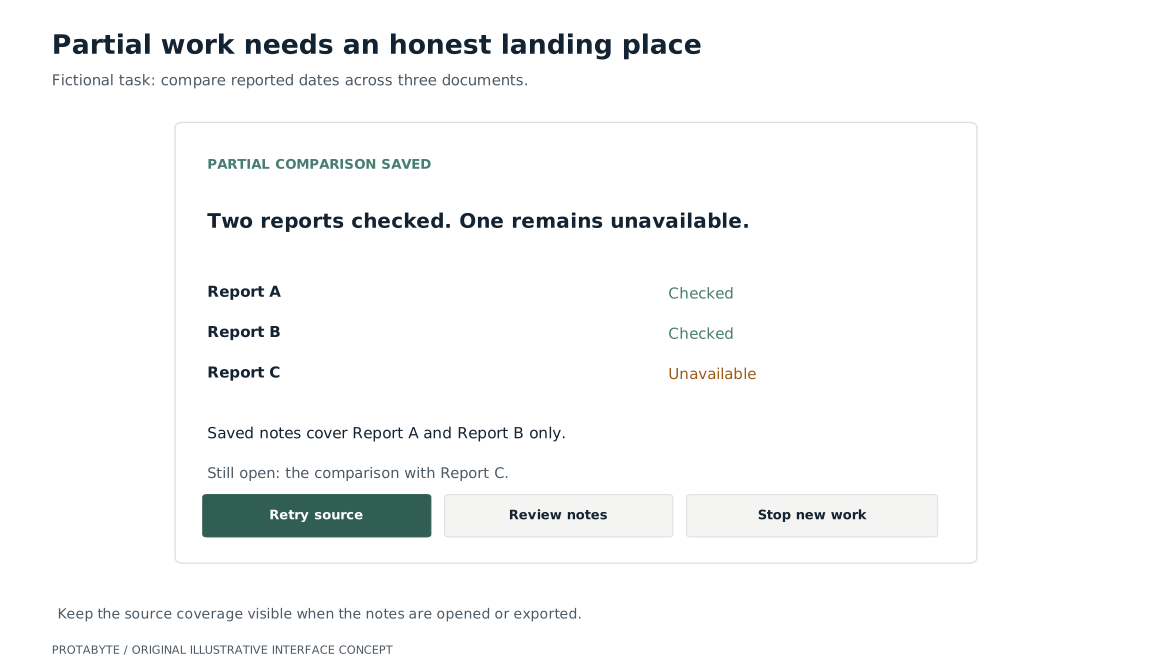
A person may choose to work with that narrower comparison. Record the changed scope so the exported result does not later appear to cover all three reports. Another person opening the notes should be able to see what was checked and what was missing.
Test whether people know what to do next
Use a prototype with continuing work, an unavailable source, a request for clarification, a stop in progress, and a partially completed result. Ask representative users to leave, return, change the task, and explain its current state.
Observe whether they restart unnecessarily, mistake a partial result for a complete answer, or wait for work that needs their input. Check whether notifications arrive at useful moments and whether saved context helps them resume. Compare these observations with the workflow the product is replacing.
People should be able to continue their day while the system works, intervene when their judgment is needed, and return to an account they can understand.
Protabyte helps teams connect AI capabilities to usable product workflows. Talk with us about making a task easier to follow, interrupt, and complete.